Evernote is a great cloud-based, multiplatform webclipper and notebook application. It's been really useful in keeping my notes in sync between my work computer (via web), home (Mac native app), and sometimes my iPod Touch (native app). However it really is inexcusable that it is missing a couple basic features.
You can't search for exact phrases, and symbols are ignored. So searching for "www.microsoft.com" returns all instances of "www", "microsoft", and "com". Imagine wading through a long webpage with multiple instances of those components.
Evernote is currently at Mac v1.8.2 and Windows v3.x. It has been around for 3 years, and gets a patch at least once a week. So why is it still missing basic features that are a no-brainer for note taking program?
Showing posts with label Technology. Show all posts
Showing posts with label Technology. Show all posts
Wednesday, May 12, 2010


Saturday, February 13, 2010
Exploring the Palm Pre Plus (Verizon) - Part 1
I've been getting tired of my Palm Centro (already obsolete at time of release). Although the frequent crashes suck, the PIM functions and physical keyboard rock, as well as the ability to go sans data plan. I decided to finally upgrade to a more modern phone and get a data plan at the same time. The Pre Plus has a physical keyboard, would let me stay with Verizon, and seems pretty slick. This is my user diary for the unit I bought on 2/12/2010.
After my first day of use...
1.Good: Universal Search and Phone app
You have rapid and flexible access to all contact options. Want access to a dial pad to to key in a number that isn't already in your phone? Run the phone app. From here you can use the touchscreen dial pad, or type using the keyboard. At the bottom are touchscreen buttons for voicemail and the call log.
As with Blackberries, it will intuit whether you are trying to look up a contact or dial a raw number. You don't need to hold the option key to switch to numeric mode to enter digits, just press the corresponding keys and it will know you are dialing digits (unless you happen to have a contact named "frtgder"). The Phone app will show you any contacts that match your search, and allow you to select any of their corresponding phone numbers to dial. However, you will not be able to send SMS, email, or IM.
Not to worry though, all you need to do is enter Card View or the Launcher, and start typing. This is called Universal Search. As with the Phone app, it will show you any matched contacts, except that in this view you will have the full range of options to call/SMS/email/IM. If you entered a string of numbers, you can also raw dial that number! Furthermore, you have the ability search Google, Google Maps, Wikipedia, or Twitter for whatever you entered. I think this is brilliant. I can look people up and contact them in multiple ways from one easy to access screen, and Universal Search is actually intelligent enough to know what I'm trying to do.
After my first day of use...
1.Good: Universal Search and Phone app
You have rapid and flexible access to all contact options. Want access to a dial pad to to key in a number that isn't already in your phone? Run the phone app. From here you can use the touchscreen dial pad, or type using the keyboard. At the bottom are touchscreen buttons for voicemail and the call log.
As with Blackberries, it will intuit whether you are trying to look up a contact or dial a raw number. You don't need to hold the option key to switch to numeric mode to enter digits, just press the corresponding keys and it will know you are dialing digits (unless you happen to have a contact named "frtgder"). The Phone app will show you any contacts that match your search, and allow you to select any of their corresponding phone numbers to dial. However, you will not be able to send SMS, email, or IM.
Not to worry though, all you need to do is enter Card View or the Launcher, and start typing. This is called Universal Search. As with the Phone app, it will show you any matched contacts, except that in this view you will have the full range of options to call/SMS/email/IM. If you entered a string of numbers, you can also raw dial that number! Furthermore, you have the ability search Google, Google Maps, Wikipedia, or Twitter for whatever you entered. I think this is brilliant. I can look people up and contact them in multiple ways from one easy to access screen, and Universal Search is actually intelligent enough to know what I'm trying to do.
Saturday, December 5, 2009
OSX 10.6: Finder FIXED! I weep with joy.
A while back I lamented how awful the 10.5 (and previous) Finders were. I complained that Apple was leaving out all sorts of long-overdue improvements and basic features that Windows had possessed for years.
Well, I just installed 10.6 yesterday, and looking through the New Features list, I'm suprised that several of my prayers have actually been answered. Not all of them, and not all are in perhaps the best way possible, but they're there. I think I need a moment alone...
Well let's go through them, shall we?
1)Restore deleted items to original folders.
Items in Trash now have a "Put Back" option, which works the same as "Restore" in Windows.
2)More reliable disk eject.
System services such as Spotlight indexing and file system events will intelligently stop their work so you can remove your drive. And improved dialogs tell you which applications are using the drive so you know what to close in order to safely disconnect your drive.
3)Change search locations.
One of those things that makes you say "Well, it's better than nothing." You can change Spotlight to have it search the currently selected folder by default. But you can't have it search by Filename by default. Say whaaaaaaa...?
4+) There's plenty more, but that's it for the Finder fixes.
Well, I just installed 10.6 yesterday, and looking through the New Features list, I'm suprised that several of my prayers have actually been answered. Not all of them, and not all are in perhaps the best way possible, but they're there. I think I need a moment alone...
Well let's go through them, shall we?
1)Restore deleted items to original folders.
Items in Trash now have a "Put Back" option, which works the same as "Restore" in Windows.
2)More reliable disk eject.
System services such as Spotlight indexing and file system events will intelligently stop their work so you can remove your drive. And improved dialogs tell you which applications are using the drive so you know what to close in order to safely disconnect your drive.
3)Change search locations.
One of those things that makes you say "Well, it's better than nothing." You can change Spotlight to have it search the currently selected folder by default. But you can't have it search by Filename by default. Say whaaaaaaa...?
4+) There's plenty more, but that's it for the Finder fixes.
Other ones are:
Quicker Time Machine backups, Faster wake/sleep, writing Chinese on the trackpad, PDF text selection that works across columns, Boot Camp support for HFS+, configurable grace period for screen locking,
Tuesday, November 17, 2009
Another (Somewhat) Open Letter To Sony
This was prompted by the recent PS3 Firmware 3.10 update, which unexplainably focused on Facebook integration, and promised more in the future. Please shoot me now.
... By linking your PlayStation Network account to your Facebook account, you will have the option for the PS3 to automatically update your Facebook News Feed with Trophy and PlayStation Store activity. You can then check out your updates, and those of your friends, on Facebook, Twitter, and other social media favorites through the PS3’s built-in web browser.This is just the beginning of our integration with Facebook...Additional highlights from update 3.10 include:
- The Photo category on the XMB has been revamped to make it easier to see more of your photos stored on the PS3.
- The PSN Friends List has been modified based on feedback we received after update 3.00. Additionally, you can now choose a color for your PSN ID on the XMB.
(via Playstation Blog)
I appreciate the better photo layout, but the other stuff seems either minor (coloring your avatar), or misdirected (Facebook integration). So many Firmware updates… and yet few have done anything to actually improve my PS3 experience. It’s such a waste of resources when there are many more important things you could be working on in the firmware updates.
1)Instead of Playstation Home (ie Second Life Redux) how about better Friend finding for multiplayer (ie a universal way to find/join friends that doesn’t require a clunky, game-specific method such as in Rock Band 2). How about cross-game chat? Xbox360 has had that for a long time. I can't believe Facebook ranked anywhere near as high on users' want lists.
2) How about the “Memory Manager” others mentioned, so that I can selectively delete DLC and saved games?
3) And a fix so that I can organize my games into albums without typing each cAsE-SeNsiTiVe album name for EACH file? Seriously, it feels like UNIX? For a company that prides itself on shiny gadgetry, the amount of interface polish is lacking.
You might want to check your priorities. Give me some of these types of important features before worrying about how to color my avatar or clog up my already overwhelmingly bloated Facebook experience.
Saturday, January 17, 2009
Belkin Paying Folks to Post Fake Reviews on Amazon
Check out this story via The Daily Background.
Apparently Belkin's "Business Development Manager of eCommerce", Michael Bayard has been found to be paying people to post positive reviews of their products, and downplay any negative reviews. The posting states you don't even need to own it. They used Amazon's own Mechanical Turk service to post the job orders.
UPDATE: Belkin confirmed this story in their apology.
Second copy available here.
Apparently Belkin's "Business Development Manager of eCommerce", Michael Bayard has been found to be paying people to post positive reviews of their products, and downplay any negative reviews. The posting states you don't even need to own it. They used Amazon's own Mechanical Turk service to post the job orders.
UPDATE: Belkin confirmed this story in their apology.
Second copy available here.
Wednesday, December 10, 2008
The Ball Droppeth... again
Sony Computer Entertainment has today announced that it will perform a worldwide release of the new PlayStation Home service on December 11, 2009. The 3D social gaming service has recently completed its lengthy beta test and will allow PlayStation 3 users to interact, communicate and share game experiences with each other.Great Sony... you just invented Second Life, except now I'll be dealing with people who don't have a keyboard. Leaving most to use BT headsets (though many people on PSN don't, and those who do, I can seldom understand them clearly).
PlayStation Home will allow open interaction among users, business partners and SCE, and will evolve with additional features including dedicated game spaces, special events and exclusive themed items, to further enrich the entertainment experience on the PS3 platform.
A variety of consumer partners will participate in Home including Paramount Digital Entertainment, Red Bull and Sony Pictures Home Entertainment.
(via Gamespy)
Well, regardless, I'm sure all my friends will be on here, just like in Second Life... oh wait, that's right... none of my friends use Second Life.
What I think more people would REALLY appreciate is for Sony to improve the ability to communicate with people on your Friends list, and to more easily hook up with them for games. I'd really appreciate a better interface for jamming with my buddy in online Rock Band 2, for instance. Seriously... "Invite a Friend" basically emails them an attachment?
Come on, Sony, make this easier. Take all these social-networking type feature and make them 2D (ie built into the XMB interface) rather than revert back to the "ooh, 3D is the Wave of the Future!" mentality of the 90's. I'd much rather have the ability to make a audio/text chat room with a few clicks in the XMB, to meet with my buddies and arrange a game, rather than go join a 3D one that involves having to run around and find people. Much more complicated.
(Note: I'm not bashing Second Life, just the fact that it's not so wildly popular that I think it justified PS Home being pushed ahead of the other updates I mentioned)
12/15/08 Update: I tried out Home the day after it went public (turns out 12/11/08 was just the public beta) and I couldn't get on. I tried again today, 5 days later and I still get a "can't connect" message. What's worse is there is no option to retry the connection. Some form of "busy redial" would seem appropriate to me. All in all, it's a bust so far. I'm asked to accept the online usage policy every time, as well.
Sunday, September 28, 2008
Swap Modifier Keys Between Macbook and External Windows Keyboard Modes
A problem with PC keyboards on the Mac is that your Option and Command keys get mapped to the Windows and Alt keys, respectively (this swaps their placement). This makes it confusing when you are switching between a Macbook's onboard keyboard and USB PC keyboard.
Well, in Keyboard & Mouse preferences you can swap the modifier keys (Option, Command, Control, and Caps Lock) to remedy this. In Tiger, you could only change this globally for all keyboards, meaning that when you switched between external and internal keyboards, you'd have to keep switching the settings if you wanted to keep the right key orientation. This gave rise to the Applescript below, from Lance Ball.
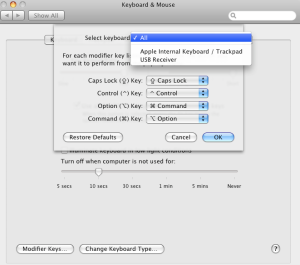
In Leopard, however, they added the ability to configure keyboards independently. You could, theoretically, leave your internal keyboard with the default setting, and only have them swapped for the external. Oh, if only this were the case. I run a Logitech Cordless Desktop MX3000, and used to, for a brief moment, have the option to do this. It was listed as "USB Reciever". However, the Logitech Control Center driver removed this. That's what brought me to the following script. This will automatically swap the Option and Command key mappings, toggling between them each time it is run. The original Lance Ball script was for Tiger, but has been adapted for Leopard. You can use this with MarcoPolo to run automatically when you add/remove your keyboard.
Update (9/29/08): I gave up using my MX3000 mouse, and went to a more ergonomic MS Natural Mouse. Since the MX3000 keyboard never worked with Logitech Control Center anyway, I just removed the driver. I've now reclaimed the ability to independently map my Logitech keyboard. Huzzah.
If you still need the Leopard script for some reason, here it is. I added code to swap the MBP’s keyboard illumination on/off (off for ‘docked’ mode. You can enable this feature as per the script comments since it's disabled by default.
Paste and save the following in Script Editor.
Well, in Keyboard & Mouse preferences you can swap the modifier keys (Option, Command, Control, and Caps Lock) to remedy this. In Tiger, you could only change this globally for all keyboards, meaning that when you switched between external and internal keyboards, you'd have to keep switching the settings if you wanted to keep the right key orientation. This gave rise to the Applescript below, from Lance Ball.

Update (9/29/08): I gave up using my MX3000 mouse, and went to a more ergonomic MS Natural Mouse. Since the MX3000 keyboard never worked with Logitech Control Center anyway, I just removed the driver. I've now reclaimed the ability to independently map my Logitech keyboard. Huzzah.
If you still need the Leopard script for some reason, here it is. I added code to swap the MBP’s keyboard illumination on/off (off for ‘docked’ mode. You can enable this feature as per the script comments since it's disabled by default.
Paste and save the following in Script Editor.
-- **********************************************************************************
-- Utility script to switch keyboard mapping for Command and Option keys.
-- Useful when you have a PC external keyboard that you use in one location, but
-- at other times you are using the builtin laptop keyboard or an Apple keyboard.
-- Author:  Lance Ball (lanceball - at - mac - dot - com)
-- Modified by: Joe Chan
-- Modified attributes: Script will change Internal Keyboard to have default behavior when
-- changing keyboards
--
-- Leopard 10.5.5 version by netgarou.  Also added feature to toggle Macbook Pro keyboard illumination.
-- (Remove the appropriate remark lines that start with "--**" to enable this if your system supports it).
-- Also disabled Growl notifications by default.
--
-- **********************************************************************************
-- Set up growl notifications
tell application "GrowlHelperApp"
-- Make a list of all the notification types
-- that this script will ever send:
set the allNotificationsList to ¬
{"External Keyboard Mode Notification", "Default Keyboard Mode Notification"}
-- Make a list of the notifications
-- that will be enabled by default.
-- Those not enabled by default can be enabled later
-- in the 'Applications' tab of the growl prefpane.
set the enabledNotificationsList to ¬
{"External Keyboard Mode Notification", "Default Keyboard Mode Notification"}
-- Register our script with growl.
-- You can optionally (as here) set a default icon
-- for this script's notifications.
register as application ¬
"Change Keyboard AppleScript" all notifications allNotificationsList ¬
default notifications enabledNotificationsList ¬
icon of application "Script Editor"
end tell
-- Open System Preferences
tell application "System Preferences"
activate
set current pane to pane "com.apple.preference.keyboard"
end tell
tell application "System Events"
-- If we don't have UI Elements enabled, then nothing is really going to work.
if UI elements enabled then
tell application process "System Preferences"
get properties
--If keyboard illumination is on, disable it when the external keyboard is connected.
--**if value of checkbox "Illuminate keyboard in low light conditions" of group 1 of tab group 1 of window "Keyboard & Mouse" is 1 then
--**    click checkbox "Illuminate keyboard in low light conditions" of group 1 of tab group 1 of window "Keyboard & Mouse"
--**end if
-- Open up the Modifier Keys sheet
click button "Modifier Keys…" of tab group 1 of window "Keyboard & Mouse"
tell sheet 1 of window "Keyboard & Mouse"
-- get the text of the 3rd pop up button
set areweDefault to "0"
set commandKey to value of pop up button 2
-- If we're in default mode, swap the keys
if commandKey ends with "Option" then
-- Change "All" keyboards
click pop up button 2
click menu item 4 of menu 1 of pop up button 2
delay 0.1
click pop up button 1
click menu item 3 of menu 1 of pop up button 1
delay 0.1
-- Send growl notification
--** tell application "GrowlHelperApp"
--notify with name ¬
--** "External Keyboard Mode Notification" title ¬
--** "External Keyboard Mode" description ¬
--** "Settings have been optimized for external keyboards" application name "Change Keyboard AppleScript"
--** end tell
--** delay 0.1
click button "OK"
else
-- We're in PC keyboard mode.  Swap back to the defaults
click button "Restore Defaults"
--** set areweDefault to "1"
-- Send growl notification
--** tell application "GrowlHelperApp"
--notify with name ¬
--** "Default Keyboard Mode Notification" title ¬
--**    "Default Keyboard Mode" description ¬
--**    "Reverted to default keyboard settings" application name "Change Keyboard AppleScript"
--**end tell
click button "OK"
end if
-- close the sheet
end tell
--** If switching back into laptop keyboard mode, then reenable the keyboard illumination if it was disabled
--** if areweDefault is "1" then
--**    if value of checkbox "Illuminate keyboard in low light conditions" of group 1 of tab group 1 of window "Keyboard & Mouse" is 0 then
--**        click checkbox "Illuminate keyboard in low light conditions" of group 1 of tab group 1 of window "Keyboard & Mouse"
--**    end if
--**end if
end tell
tell application "System Preferences" to quit
else
-- UI elements not enabled.  Display an alert
tell application "System Preferences"
activate
set current pane to pane "com.apple.preference.universalaccess"
display dialog "UI element scripting is not enabled.
Check \"Enable access for assistive devices\""
end tell
end if
end tell
Spore: Round One
I started playing Spore this week. I don't know how the online reviewers could claim that the performance was good even on less powerful machines. I have it running on my Macbook Pro 2.2ghz (Geforce 8600M 128MB) with all the settings turned down, and it *CRAWLS* once past the Cell stage. Anyway, here are two of the products from my game: my species, and a land vehicle for them. Although not much of a game at this point in development, the creator tools really are amazing. I'm looking forward to seeing what else I can come up with.
Yeah, it looks kinda funny... but I'm proud of the duck head. It reminds me of the one on Wade's swimming tube from the US Acres/Garfieldd & Friends cartoon.

[caption id="" align="alignright" width="250" caption="Wade Duck"] [/caption]
As you progress to each new stage (Cell->Creature->Tribal->Nation->etc) your species develops one of three specializations depending on your choices in the last stage. For some reason mine became faith/culturally based. Thus in the Civilization stage I must use faith to convert other rival nations. Hence, this guy here is the "Faithinator 1000". Those loudspeakers coming out the side blare the word of Cthulhu to the heathen. I'm somewhat proud of the VW-Hippopotamus look that it's taken on, and only wish the legs would articulate when the unit is moving in the game (what's the point in putting in legs if you can't see them walk?).

Yeah, it looks kinda funny... but I'm proud of the duck head. It reminds me of the one on Wade's swimming tube from the US Acres/Garfieldd & Friends cartoon.
[caption id="" align="alignright" width="250" caption="Wade Duck"]
[/caption]As you progress to each new stage (Cell->Creature->Tribal->Nation->etc) your species develops one of three specializations depending on your choices in the last stage. For some reason mine became faith/culturally based. Thus in the Civilization stage I must use faith to convert other rival nations. Hence, this guy here is the "Faithinator 1000". Those loudspeakers coming out the side blare the word of Cthulhu to the heathen. I'm somewhat proud of the VW-Hippopotamus look that it's taken on, and only wish the legs would articulate when the unit is moving in the game (what's the point in putting in legs if you can't see them walk?).

Saturday, August 30, 2008
OSX 10.6 Snow Leopard: Fix the Finder!
With OS X 10.6 "Snow Leopard", Apple's Goal is to "Enhance the performance of OS X, set a new standard for quality and lay the foundation for future OS X innovation." They are promising that, although there will be no huge feature additions, 10.6 will be worth our while since it will give Apple the opportunity to clean up their code and make a cleaner, leaner, meaner OS X.
Yet, missing from the feature list which includes things like Grand Central, is something that Mac users have been clamoring for for a while: An overhaul of the Finder.
I will totally get this upgrade if, on their list of fixes they fix the #%@#% Finder. Seriously, it's the most used, most prominent element of OS X in need of an update. Most people will get way more mileage out of an overhaul of the Finder than any of the other things I've seen listed.
For instance, fix the crashes, have Trash remember the origin of deleted files so you can actually recover them, and have enable Undo/Trash support for files that are erased by the "copy and replace" Finder operation. For that matter, how about a "copy and merge" function instead of (or in addition to) the aforementioned?
Yet, missing from the feature list which includes things like Grand Central, is something that Mac users have been clamoring for for a while: An overhaul of the Finder.
I will totally get this upgrade if, on their list of fixes they fix the #%@#% Finder. Seriously, it's the most used, most prominent element of OS X in need of an update. Most people will get way more mileage out of an overhaul of the Finder than any of the other things I've seen listed.
For instance, fix the crashes, have Trash remember the origin of deleted files so you can actually recover them, and have enable Undo/Trash support for files that are erased by the "copy and replace" Finder operation. For that matter, how about a "copy and merge" function instead of (or in addition to) the aforementioned?
Tuesday, May 27, 2008
Who Knew Billy G Was Funny?
Despite how much I hate Micro$oft and it's crappy, do-nothing software that hasn't changed significantly in 10 years, I have to admit that Gates is pretty funny in this.
Tuesday, March 25, 2008
The Mac Trash Bin
I hate to admit it, but Windows actually has one advantage over OS X, and that's the handling ofdeleted files. Sure, on both systems you can always undo the last operation (well, not always... I'm not going to make that blanket statement). However, Windows Recycle Bin has a few big advantages:
Windows Recycle Bin remembers where each file came from.
Just right click an item and choose restore, and it will go back to the right place. Very important for those deleted preference files that need to end up in some arcane location in your Documents and Settings. In OS X, good luck placing stuff back in to the right folder. Strange that OS X is all about metadata but doesn't keep track of this.
You can selectively remove items from the trash
As opposed to OS X's all-or-nothing "Empty Trash" option.
When you're copying a folder and another of that same name already exists in the destination, Mac only gives you an option to Replace.
This deletes the existing folder then copies the new one in it's place (see common Finder gripes: "Replace vs Merge"). Something deleted in this way doesn't go to the Trash. This is insult to injury: Not only are you surprised to find that you just accidently did a delete and replace instead of the far more common and expected merge, but then you're double-screwed because Apple decided to disable Undo for this most destructive of actions. It's pretty evil.
And to all the Mac users out there: all the other OS's do merge, or will at least give the option for it. I'd at *least* like Finder to present this choice, especially since the Merge operation is a lot harder for a user to replicate on their own, than a Replace. By the way, it's not perfect, but you can reclaim some of your lost Merge with MergetoFinder applescript

Windows Recycle Bin remembers where each file came from.
Just right click an item and choose restore, and it will go back to the right place. Very important for those deleted preference files that need to end up in some arcane location in your Documents and Settings. In OS X, good luck placing stuff back in to the right folder. Strange that OS X is all about metadata but doesn't keep track of this.
You can selectively remove items from the trash
As opposed to OS X's all-or-nothing "Empty Trash" option.
When you're copying a folder and another of that same name already exists in the destination, Mac only gives you an option to Replace.
This deletes the existing folder then copies the new one in it's place (see common Finder gripes: "Replace vs Merge"). Something deleted in this way doesn't go to the Trash. This is insult to injury: Not only are you surprised to find that you just accidently did a delete and replace instead of the far more common and expected merge, but then you're double-screwed because Apple decided to disable Undo for this most destructive of actions. It's pretty evil.
And to all the Mac users out there: all the other OS's do merge, or will at least give the option for it. I'd at *least* like Finder to present this choice, especially since the Merge operation is a lot harder for a user to replicate on their own, than a Replace. By the way, it's not perfect, but you can reclaim some of your lost Merge with MergetoFinder applescript
Sunday, February 17, 2008
But at the Market, isn't it Spelled "McIntosh"?
I now has a Macbook. w3rd!
To anyone who has tried them both: I ask whether you prefer Word 2008 or iWork's Pages '08? Same goes, to a lesser extent, for the other Office vs iWorks components.
Leopard rocks, so much so that it is a worthy point of procrastination to mention it at midnight when I still have a paper left to write....
Addendum:
To anyone who has tried them both: I ask whether you prefer Word 2008 or iWork's Pages '08? Same goes, to a lesser extent, for the other Office vs iWorks components.
Leopard rocks, so much so that it is a worthy point of procrastination to mention it at midnight when I still have a paper left to write....
Addendum:
Thursday, February 14, 2008
Widescreen Goodies
It's really hard to find high resolution (1280 and above) wallpaper, let alone in widescreen. Those of you with 1920x1200 displays feel my pain. I've gotten some compliments on my choices of backdrops, so I thought I would share a few of my sources. Check them out, if, like me, you are blessed with 24 inches.

My favorite. He has some free ones, but the main stuff you have to pay for with a nominal fee ($10), that gets you lifetime access to the site. New picts are periodically added.
What else can I say? Possibly the best repository on the web. Link to widescreen section Warning: I can't seem to find any that go beyond 1400x900. Might be a limitation imposed by the site.
HDR Walls
They have a nice collection of High Dynamic Range photos, at high resolutions. It involves shooting multiple times, with different exposures, and layering them to create dramatic lighting effects and saturation. Not all of them are high-def. But some go up to 1920x1200.


Some good images and wallpaper (not all of which are widescreen) ripped from various parts of the Interwebs. Oh, and there are some pretty women to look at too.
Addendum: Although not widescreen (or highres, they max out at 1600x1200) this site has excellent wallpaper: http://www.salvatorescandurra.com/wallpapers/
Plasmadesign.co.uk
My favorite. He has some free ones, but the main stuff you have to pay for with a nominal fee ($10), that gets you lifetime access to the site. New picts are periodically added.
deviantART
What else can I say? Possibly the best repository on the web. Link to widescreen section Warning: I can't seem to find any that go beyond 1400x900. Might be a limitation imposed by the site.
HDR Walls
They have a nice collection of High Dynamic Range photos, at high resolutions. It involves shooting multiple times, with different exposures, and layering them to create dramatic lighting effects and saturation. Not all of them are high-def. But some go up to 1920x1200.
Babes & Wallpapers
Some good images and wallpaper (not all of which are widescreen) ripped from various parts of the Interwebs. Oh, and there are some pretty women to look at too.
Addendum: Although not widescreen (or highres, they max out at 1600x1200) this site has excellent wallpaper: http://www.salvatorescandurra.com/wallpapers/
Tuesday, February 5, 2008
Nifty Technology Demos
A new concept in interactive lighting from Philips
By far the coolest Wii hack/VR demo I've seen. Simple, practical, and powerful.
By far the coolest Wii hack/VR demo I've seen. Simple, practical, and powerful.
Friday, December 14, 2007
Facebook invite overload
Is anyone else annoyed at how with any facebook app, it bugs you at every turn to invite all your friends? It’s a really annoying way that they’re forcing us to send invites to everyone in order to get rid of the screen.
Saturday, December 8, 2007
iTunes AAC Encoding
Like Lisa Simpson, maybe I'm the answer to a question nobody asked...
I was curious what the "VBR Encoding" option was in iTunes for windows (Prefs->Advanced->Impoting->AAC Encoder)
iTunes can only access ABR and VBR_Constrained. ABR is the default. Checking VBR sets VBR_Constrained mode. So use that for best quality for your rips.
Apple AAC encoder offers four encoding modes:
Constant Bit Rate (CBR) -- Recommended for live streaming --
This mode achieves a constant target bit rate and is completely compliant to the CBR mode specified in the MPEG-4 standard.
Average Bit Rate (ABR) - Default Mode
-- Recommended for controlling file size --
A target bit rate is achieved over a long term average (typically after the first few seconds of encoding). This mode provides almost best global quality while still being able to strictly control the resulting file size and with less complexity than the CBR mode.
Variable Bit Rate (VBR)
-- Recommended for controlling the audio quality --
The audio signal is encoded with constant (and settable) quality and virtually no bit rate constraints. This is the best mode to achieve consistent audio quality across many files with the smallest file size to achieve that quality. It also has the lowest complexity of all the encoding modes.
Variable Bit Rate But Constrained (VBR_Constrained)
-- Recommended as a compromise between VBR and ABR --
This mode is similar to VBR but limits the average bit rate variation. The lower limit is the user-selected bit rate. Higher bit rate is adapted for difficult tracks and can generate up to 10% larger files than the ABR mode.
I was curious what the "VBR Encoding" option was in iTunes for windows (Prefs->Advanced->Impoting->AAC Encoder)
iTunes can only access ABR and VBR_Constrained. ABR is the default. Checking VBR sets VBR_Constrained mode. So use that for best quality for your rips.
Apple AAC encoder offers four encoding modes:
Constant Bit Rate (CBR) -- Recommended for live streaming --
This mode achieves a constant target bit rate and is completely compliant to the CBR mode specified in the MPEG-4 standard.
Average Bit Rate (ABR) - Default Mode
-- Recommended for controlling file size --
A target bit rate is achieved over a long term average (typically after the first few seconds of encoding). This mode provides almost best global quality while still being able to strictly control the resulting file size and with less complexity than the CBR mode.
Variable Bit Rate (VBR)
-- Recommended for controlling the audio quality --
The audio signal is encoded with constant (and settable) quality and virtually no bit rate constraints. This is the best mode to achieve consistent audio quality across many files with the smallest file size to achieve that quality. It also has the lowest complexity of all the encoding modes.
Variable Bit Rate But Constrained (VBR_Constrained)
-- Recommended as a compromise between VBR and ABR --
This mode is similar to VBR but limits the average bit rate variation. The lower limit is the user-selected bit rate. Higher bit rate is adapted for difficult tracks and can generate up to 10% larger files than the ABR mode.
Subscribe to:
Posts (Atom)
After using Pages (iWork’s wordprocessor) some more, I have to say, it’s nice, but because it uses it’s own format, I find myself still saving in .DOC format a lot in order to port my files between systems, and saving to other formats sucks.
If you save as a Word .DOC…
So basically it treats DOC as an alien format, and different rules apply. Very similar to Photoshop’s “Save a Copy” option.